
A client likes a home but still worries about whether they can afford it?
With the Quick loan preview feature on Citics Agent, brokers can proactively look up preliminary loan information for a property right on their phone, ready to advise whenever the client needs!
Key benefits of the Quick loan preview feature
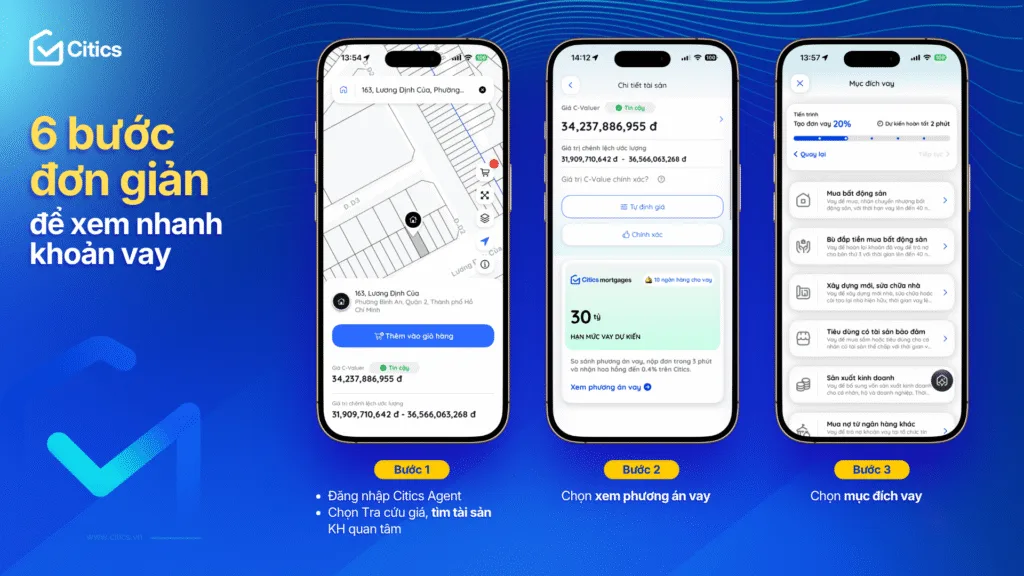
In about 1 minute, brokers can quickly grasp the information they need:
Estimated loan amount: Quickly see a preliminary loan amount for the property the client is interested in.
Suitable banks for reference: Look up banks, branches, interest rates and the expected loan approval time.
A proactive next step: Submit the loan application directly on Citics Agent without re-entering the property information.
How to use the Quick loan preview feature on Citics Agent
Step 1:
– Log in to Citics Agent
– Choose Price lookup and find the property the client is interested in
Step 2: Choose View loan options
Step 3: Choose the Loan purpose
Step 4:
– Compare banks
– Compare banks
– Choose a suitable bank and branch
Step 5: Enter the client's information
Step 6: Submit the application successfully

With financial information at hand just when the client needs it, brokers can easily pick up the conversation, help the client picture a suitable way to buy the home, and keep their interest in the home they are viewing.
Open Citics Agent and try the Quick loan preview feature now!